This webhook is deprecated. Use the Call event webhooks.
When a call is completed, Voiso sends call data to the CRM.
Activation
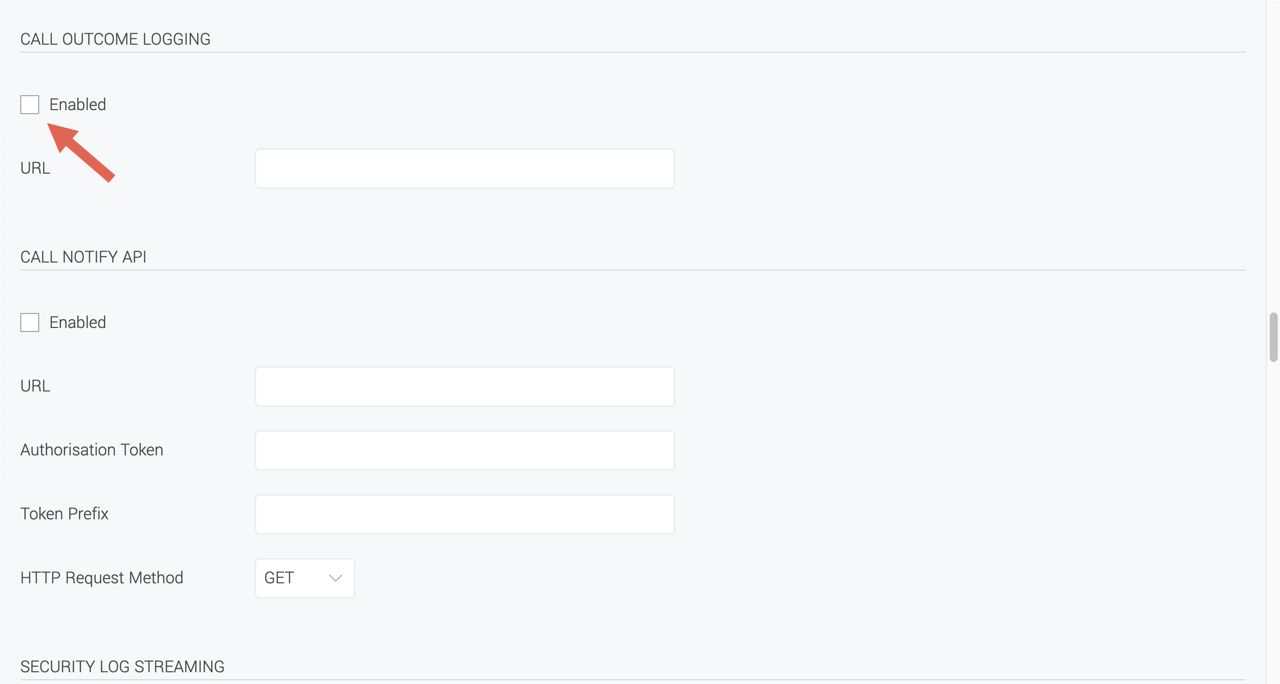
To use the Call Outcome Logging webhook, you must first enable it in the Voiso System Settings. Navigate to Administration > System Settings and enable the Call Outcome Logging checkbox.
After enabling the Call Outcome Logging webhook feature, complete the following configuration settings:
- URL: The URL of your CRM API.
Event
After each call, Voiso sends data for the specified endpoint by POST.
Sent Object
{
    "uuid": "07771c38-c159-4965-a878-be0162118b2b",
    "agent_extension": "111",
    "start_time": 1630664544.661,
    "end_time": 1630664575.994,
    "type": "callback",
    "duration": 31.333,
    "disposition": "answered",
    "ani": "443336006114",
    "dnis": "18885658889"
}
Fields
| Name | Type | Description | Value |
|---|---|---|---|
| uuid | string | call uuid | |
| agent_extension | string | user extension number | |
| start_time | number | call start time in unix timestamp | |
| end_time | number | call end time in unix timestamp | |
| type | string | call type | inbound, outbound, dialer, callback, outbound_sms |
| duration | number | call duration in seconds | |
| disposition | string | end call reason | answered, failed, busy, no_answer, missed, abandoned, rejected, dialer_abandoned, system_abandoned, answered_by_VM, system_reject, machine_answered |
| ani | string | origination number | |
| dnis | string | destination number | |
| account_id | string | the customer’s ID (name) from CRM. Valid for c2c calls only. |
If the client or CRM responds that there are no POST messages on the specified URL, there might be an error in the domain, or the cluster IP might not be allow-listed. Try to open the domain of the specified URL in a browser or ping the webhook.site from the example. Ensure that the SSL certificate is correct.