Who should read this article: Administrators
If you are used to Inbound > Flows, this article helps you find your way around the new Workflow studio. Use the table below to see where each feature was before and where it is now.
Introduction
Flows are now called workflows, and they have moved to a new place, together with a new kind of workflow, the Automation. Workflow studio puts everything that decides what happens to a call or a message in one list:
- Inbound call workflows — what used to be voice flows.
- Digital workflows — what used to be digital flows.
- Automations — new. They send an SMS or WhatsApp message after a call or conversation ends. Refer to Automations overview.
Your existing flows were moved for you. You do not need to do anything, and they route calls and messages the same way as before.
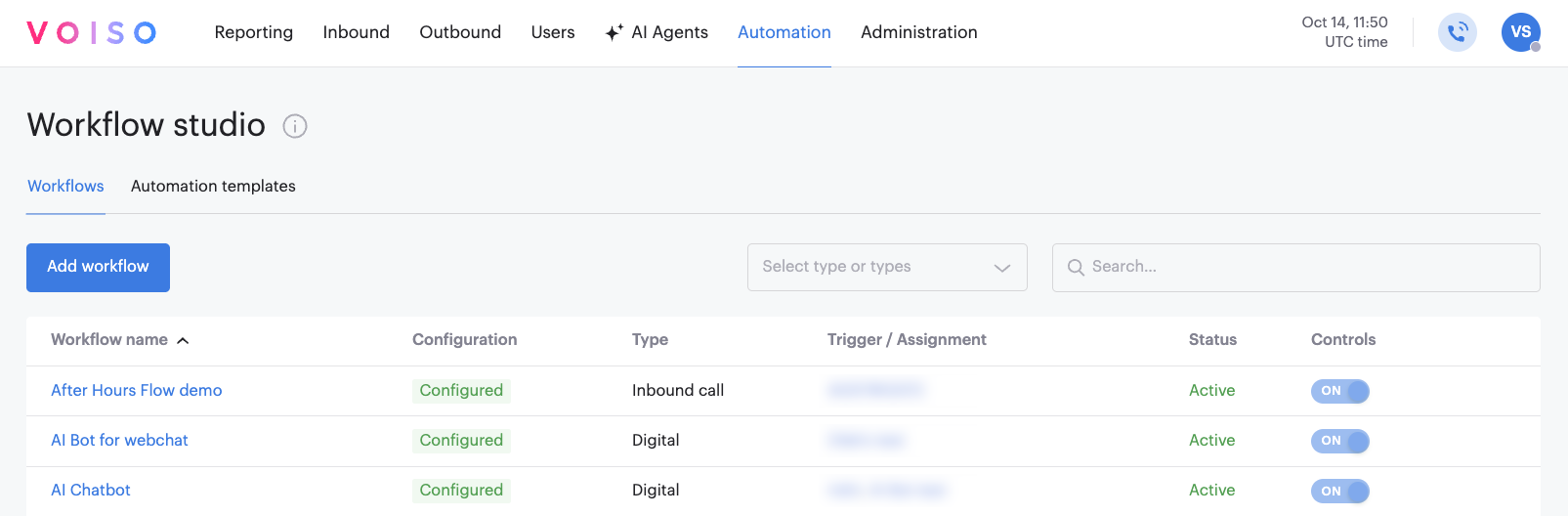
What moved where
| # | Feature | Before | Now |
|---|---|---|---|
| 1 | Where to find your flows | Inbound > Flows | Automation > Workflow studio, Workflows tab |
| 2 | Name | Flow | Workflow |
| 3 | Voice flows | Voice type | Inbound call type, called Inbound call workflow |
| 4 | Digital flows | Digital type | Digital type, called Digital workflow |
| 5 | Add a new flow | Add flow panel: choose the type, then Continue | Add workflow window: choose Inbound call workflow or Digital workflow, then Next |
| 6 | The list of flows | Flow name, Type, Configuration, Numbers and digital channels | Workflow name, Configuration, Type, Trigger / Assignment, Status, Controls |
| 7 | Find a flow | Search by name | Search by name, or filter by type |
| 8 | Settings page | Edit flow, with Flow name and Route to flow | Edit workflow, with Workflow name and Route to workflow |
| 9 | Building the steps | Flow builder, opened with Launch Flow builder | Workflow builder, opened with Launch Workflow builder |
| 10 | Permissions | View Flows and Edit Flows, in the Inbound section of the security access group | View Workflows and Edit Workflows, in the Automation section of the security access group |
| 11 | Other pages | Flows column on Numbers and Digital channels; Flow and Flow logs in Call Detail Records; Call flows tab on the Dashboard | Workflows column; Workflow and Workflow logs; Call workflows tab |
| 12 | Automations and Automation templates | — | New. Workflows and Automation templates tabs in Workflow studio |
Refer to Workflows for the full description of the new list.
What stays the same
You still set up Inbound call and Digital workflows the way you are used to:
- The settings page, including Business hours, Outside business hours, and the assigned numbers, digital channels, and supervisors
- Building the steps in Workflow builder, with all the steps you already use
- Cloning and deleting a workflow from the list
- How calls and messages are routed