Who should read this article: Administrators
AI agents are billed by the minutes they spend on calls, not per agent. On the AI Agents tab of the Billing page you choose how those minutes are paid for, see what has been used, and buy more.
The AI Agents tab appears once Voiso enables the AI Agents feature for your contact center. Access to the Billing page depends on your role or security access group. Refer to Billing for more information.
Introduction
There are two ways to pay for AI agent minutes, and you can move between them at any time.
| Option | How it works |
|---|---|
| Pay-as-you-go | No upfront cost and no commitment. Every minute an AI agent spends on a call is taken from your account balance at your per-minute rate. This applies when you have no plan, and whenever a plan runs out of minutes. |
| Monthly plan | You pre-pay for a set number of minutes each month and get a lower rate per minute. The plan renews automatically on the 1st of each calendar month. |
The number of AI agents you run does not change the price. A plan belongs to the contact center, and all of your AI agents draw on the same pool of minutes.
The first time you save an AI agent, Voiso shows a short overview of these two options so you know how usage will be charged before it starts.
The AI Agents tab
From the Voiso navigation bar, navigate to Administration > Billing, then select the AI Agents tab.
Active plan and usage
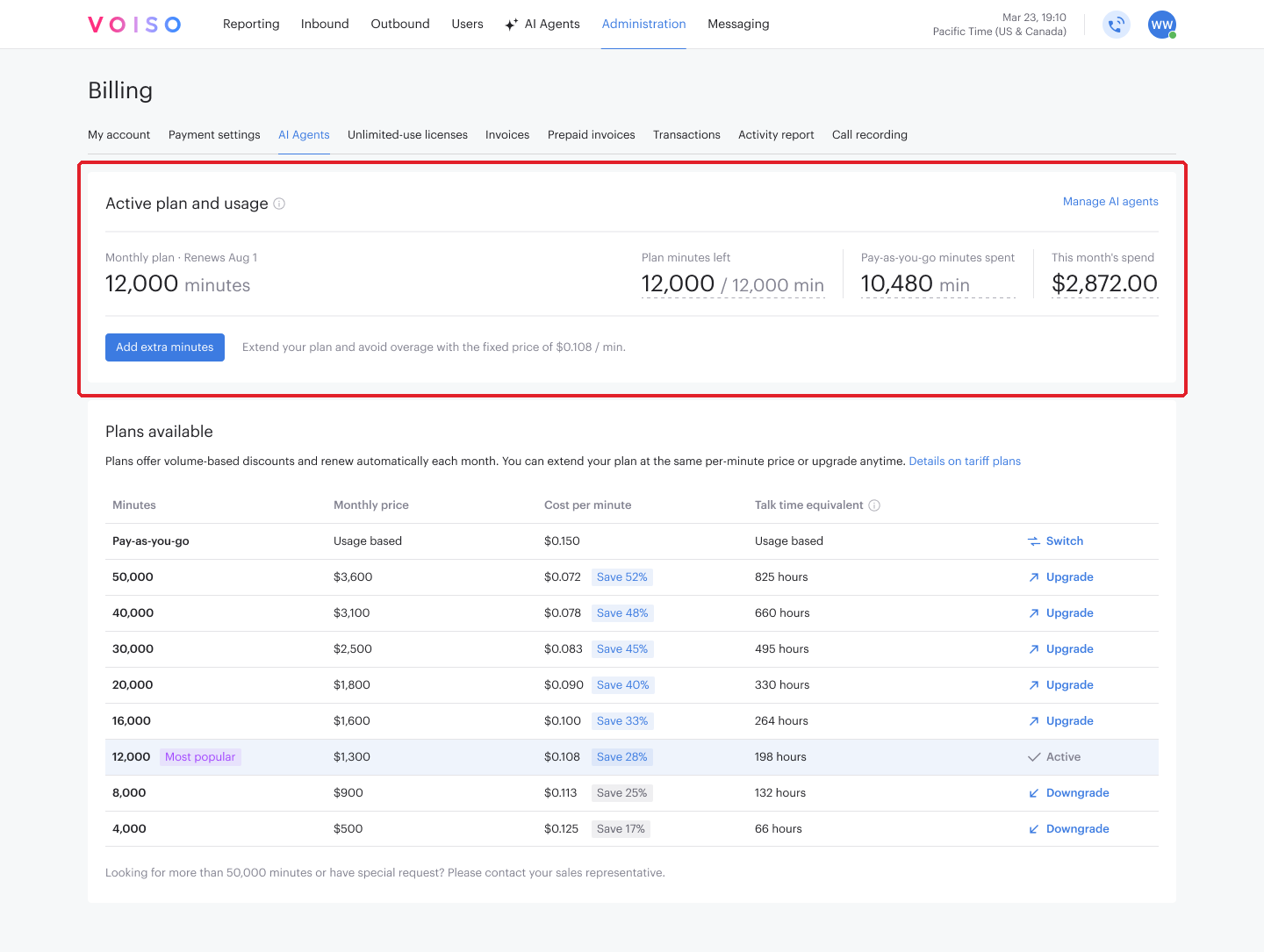
The top panel shows what you are on now and what has been used this month.
| Field | Description |
|---|---|
| Plan | Pay-as-you-go with your per-minute rate, or Monthly plan with its minutes and its renewal date. |
| Plan minutes left | Minutes still available this month, against the total granted. The total includes any extra minutes you added. |
| Pay-as-you-go minutes spent | Minutes charged to your balance this month, outside the plan. |
| This month's spend | What AI agent usage has cost this month. |
Point at a figure to see how it breaks down between the plan, extra minutes, and pay-as-you-go.
Manage AI agents opens the AI Agents page, where the agents themselves are configured. Refer to AI Agents for more information.
Plans available
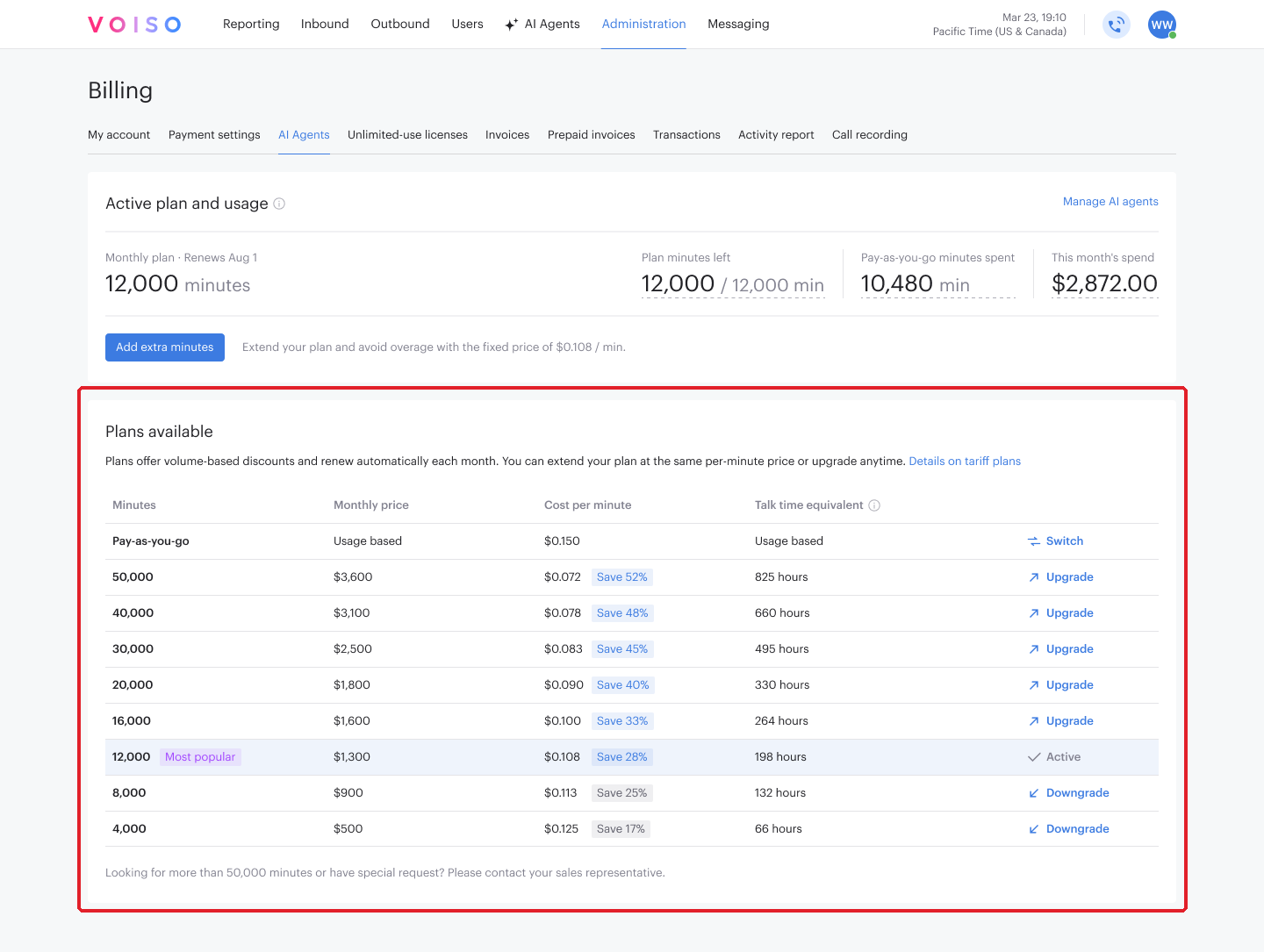
The lower panel lists pay-as-you-go and every monthly plan.
| Column | Description |
|---|---|
| Minutes | The minutes the plan grants each month. A badge marks the most popular plan. |
| Monthly price | What the plan costs each month. |
| Cost per minute | The rate the minutes work out at, with the saving against the pay-as-you-go rate. |
| Talk time equivalent | The plan's minutes expressed as hours of talk time. |
The last column carries the action for each row — Select, Upgrade, Downgrade, or Switch — and marks your current plan as Active.
Need more minutes than the largest plan offers, or terms of your own? Contact your sales representative.
How minutes are counted
The time an AI agent is on a call is counted in seconds and taken when the call ends, so a 90-second call uses 1.5 minutes.
Minutes come out of your plan first. Once the plan and any extra minutes are used up, further usage is charged to your account balance at the pay-as-you-go rate. The countdown stops at zero rather than going negative.
Unused plan minutes reset at the end of each calendar month. Nothing carries over.
AI agent minutes cover the agent's conversation. The telephony for those calls is charged under your existing Voiso tariff, as it is for calls handled by people. An AI agent carries no virtual agent licence fee, and speech recognition on its calls is not charged separately.
Taking a plan
- On the AI Agents tab, find the plan you want in Plans available and click Select.
- Check the summary of the price and terms.
- Click Confirm.
The full monthly price is taken from your balance straight away, whatever day of the month it is, and all of the plan's minutes become available immediately. The plan then renews on the 1st of each month with a new charge.
If your balance does not cover the price, the purchase is blocked and nothing is charged. Add funds and try again, or choose a smaller plan.
Adding extra minutes
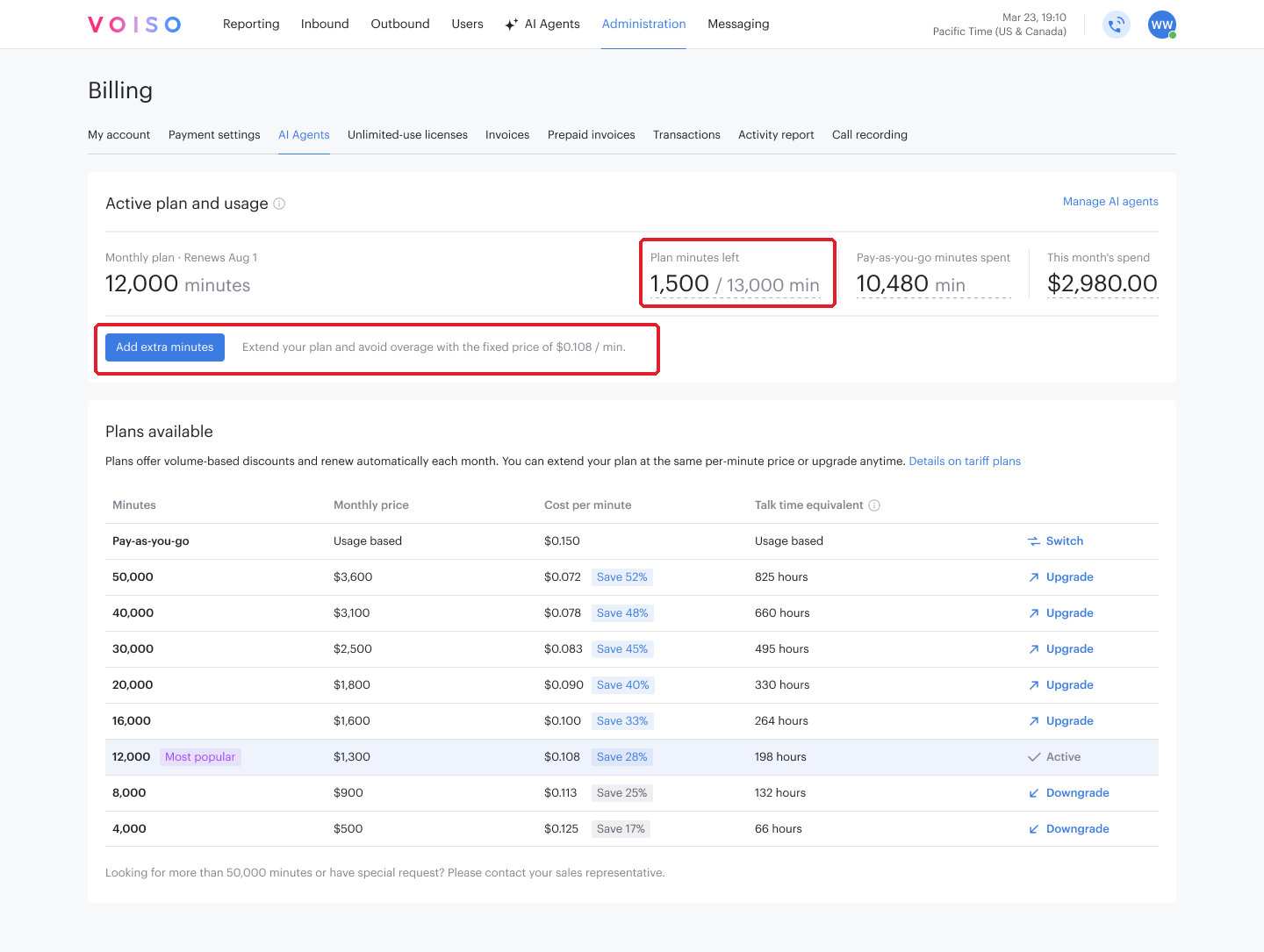
When a plan runs low before the month ends, you can top it up at your plan's per-minute rate instead of paying the higher pay-as-you-go rate.
- In Active plan and usage, click Add extra minutes.
- Check the summary of the minutes and the price.
- Click Confirm.
The minutes are added immediately and the price is charged in full. You can do this as many times as you need within the month. Extra minutes are a one-time purchase — they do not renew, and they expire with the rest of your minutes at the end of the calendar month.
Changing or cancelling a plan
Moving to a different plan, or leaving plans altogether, takes effect on the 1st of the next month. Your current plan stays active until then, with the minutes you have already paid for, and nothing is charged on the day you make the change.
- To move to another plan, click Upgrade or Downgrade on that plan's row, review the comparison of the current and new plan, then click Confirm.
- To leave plans and return to pay-as-you-go, click Switch on the Pay-as-you-go row and confirm.
While a change is pending, the panel shows the date it takes effect. Submit another change before that date and it replaces the pending one.
To call off a pending change, click Keep current plan in the panel, or Keep active plan in the plans table, and confirm. Your existing plan then carries on as normal.
Extra minutes can still be bought on a plan that is scheduled to end.
Running low on minutes
Voiso notifies you when a plan's remaining minutes fall below 500, and again when they reach zero, so you can decide whether to add extra minutes before usage moves to the pay-as-you-go rate.
Upcoming charges and invoices
While you have an active plan, the My account tab shows Estimated upcoming charge for your AI agent plan. It reflects the plan that will be charged at the next renewal — the new one if a change is pending — and covers the recurring plan price only, not extra minutes or pay-as-you-go usage. The record does not appear when you have no plan, or when your plan is scheduled to be cancelled.
On your invoice, AI agent charges appear as aggregated lines: the plan, any extra minutes bought in the period, and pay-as-you-go minutes.
AI agent conversations, including transcriptions and insights, appear in Call Detail Records.