Who should read this article: All users
View HubSpot contact details automatically when handling inbound messages in Agent Panel.
Introduction
When your contact center is integrated with HubSpot and CRM Contact Lookup is enabled, Voiso automatically retrieves and displays the associated HubSpot contact details for inbound voice calls. If the contact’s phone number matches a HubSpot contact, their information appears in Agent Panel. This allows you to view key contact details without switching applications or searching manually.
Contact information in Agent Panel
Viewing Contact information in Agent Panel
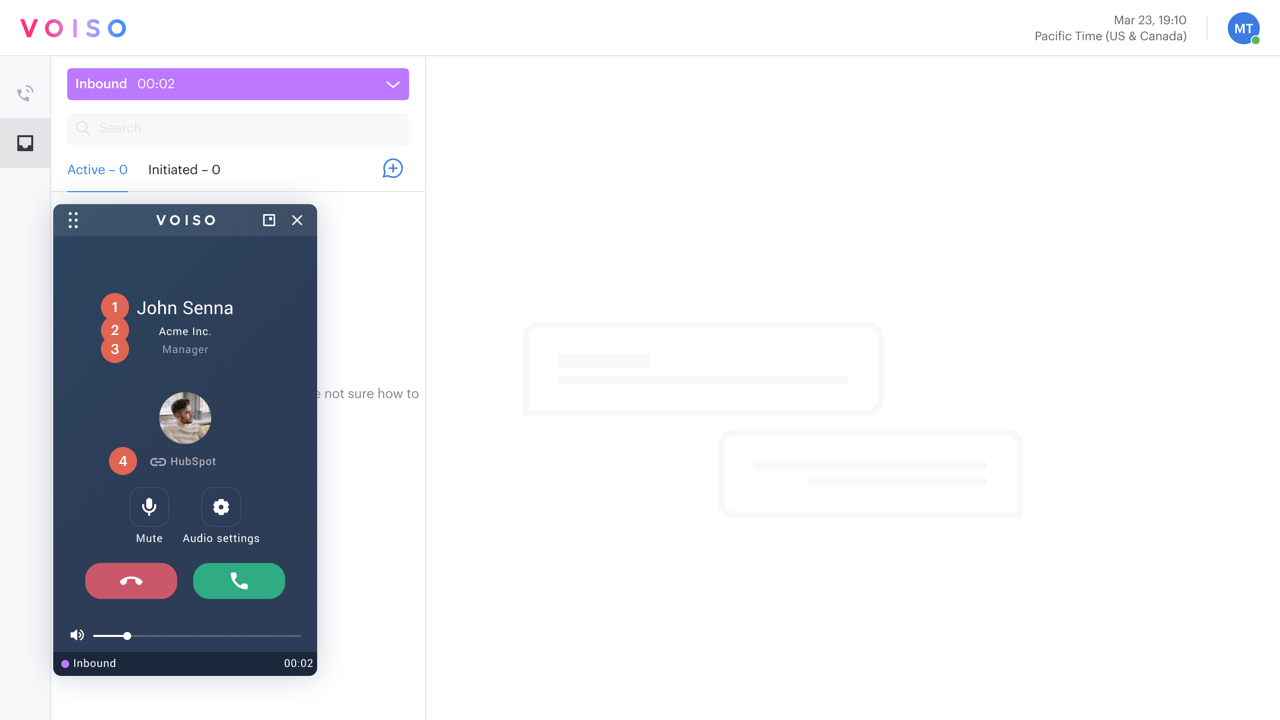
When an inbound call is received Voiso checks for a matching contact in your connected CRM. If a match is found, the contact's information is displayed in Agent Panel.
The following contact information is displayed:
| # | Heading | Description |
|---|---|---|
| 1 | Display Name | The full name of the contact |
| 2 | Company name | The business name associated with the contact. |
| 3 | Job title | The business position held by the contact at the associated business. |
| 4 | CRM link | The name of the CRM where the contact phone number was matched. Click the link to open the contact record in the CRM. |
If the call is associated with a digital interaction, it will be displayed in the Interaction History in the Contact panel.