Who should read this article: Administrators, Supervisors
Connect a third-party voice bot to Voiso as a Virtual agent so you can route calls to it, include it in Dialer campaigns, and hand calls back to human agents when needed.
Introduction
Bring your own bot (BYOB) lets you connect a supported third-party voice AI platform to Voiso and use the bot as a Virtual agent in your contact center.
With this setup, the bot handles the conversation logic, voice generation, and provider-side configuration. Voiso handles telephony, SIP routing, call routing, reporting, recording, and overall contact center operations.
Once connected, a Virtual agent can be used in the same call handling scenarios as other users in your contact center, including inbound routing through Workflow builder and outbound calling through Dialer campaigns.
Bring your own bot must be enabled for your contact center before you can connect a bot provider integration.
How bring your own bot works
Bring your own bot uses a Virtual agent to represent the external bot inside Voiso.
The provider integration creates or connects the provider-side bot and links it to a Virtual agent in your contact center. Once that Virtual agent exists, you can assign it to queues, use it as a routing destination, and include it in Dialer campaigns.
In general:
- The bot provider manages the bot’s behavior, prompt, tools, and voice output
- Voiso manages SIP connectivity, routing, recordings, reporting, and contact center level configuration
- The Virtual agent acts as the connection point between the external bot platform and Voiso
What you can do with a Virtual agent
After you connect a supported bot provider, you can use the Virtual agent in the following ways:
- Route inbound calls to the Virtual agent with the Route node in Workflow builder
- Add the Virtual agent to Dialer campaigns for outbound calling
- Review bot-handled calls in call recordings and reports, including the bot, the contact, and the human agent if the call is handed off
- Transfer calls to and from the Virtual agent as part of your call handling process
- Hand a call back to a human agent when the bot can no longer resolve the interaction
Supported provider integrations
Voiso currently provides dedicated integrations for selected voice AI providers.
For provider specific setup instructions, see:
Although each provider has its own setup steps, the role of the Virtual agent in Voiso is the same.
Routing calls to a Virtual agent
Once the integration is connected and the Virtual agent is available, you can route calls to it through Workflow builder or use it in Dialer campaigns.
For inbound scenarios, assign an extension to the Virtual agent if you want to use it as a direct routing destination in Workflow builder. If the Virtual agent will only be used in Dialer campaigns, an extension is not required.
Handoff the call to Voiso
When an external bot handles a call through bring your own bot, it operates outside your Voiso workflows. If the bot decides that a human should take over, it must explicitly route the call back into Voiso. The handoff is done by sending a SIP REFER to a destination SIP URI in Voiso. This transfer bypasses your Inbound call workflow and sends the call directly to the destination you specify.
You can handoff the call to any of the following:
- A queue extension
- An individual Standard User extension
- An external number
SIP URI format
To return the call to Voiso, use this format:
sip:{extension}@{tenant}.voiso.com
For example: sip:4323@yourcompany.voiso.com
Where to find the required values
To build the SIP URI, you need:
-
Extension
- For a queue, go to Inbound > Queues and open the queue settings
- For a user, go to Users > Users and open the user settings
-
Tenant domain
- Copy the domain portion of the SIP address shown in user settings as shown in this screenshot:
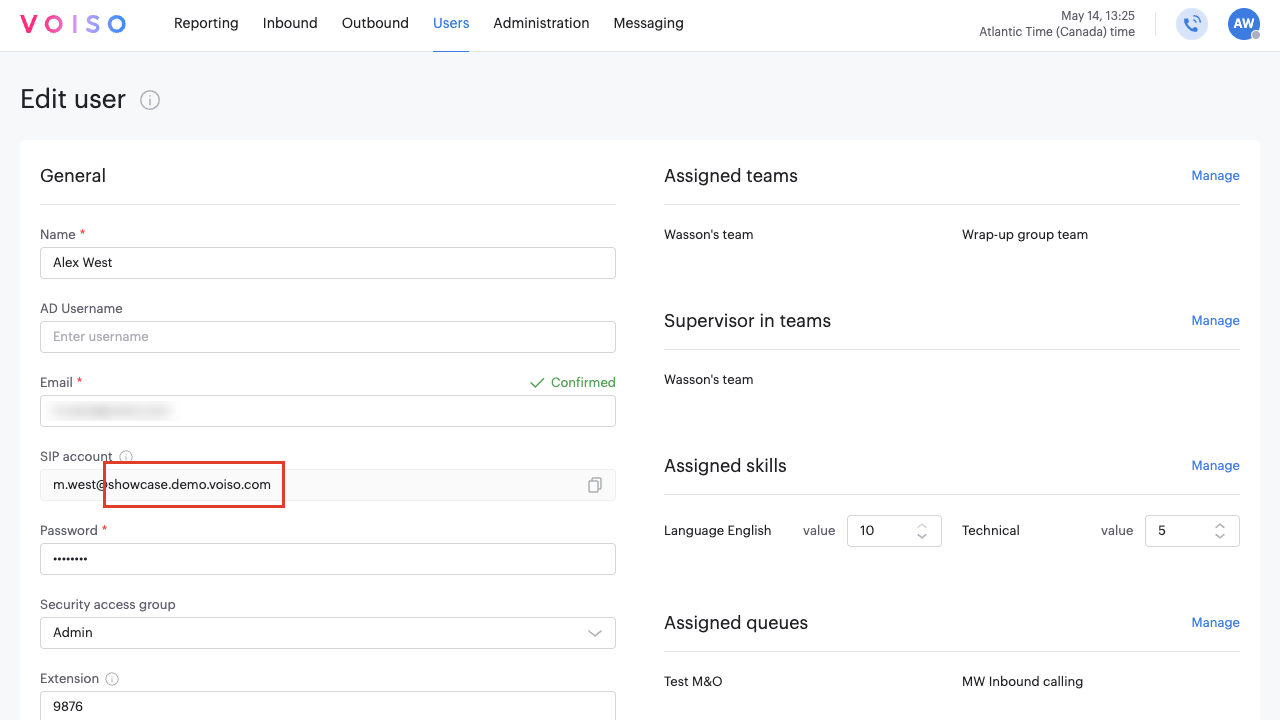
- Copy the domain portion of the SIP address shown in user settings as shown in this screenshot:
Provider specific handoff setup
The exact handoff configuration depends on your bot provider. Consult your provider documentation for details.
If your provider supports SIP based call transfer, refer to that provider’s documentation for the exact field or transfer action to use.
Choosing the handoff destination
Use a queue when you want Voiso to distribute the transferred call according to queue logic and agent availability.
Use an individual Standard User extension when the bot should send the caller to a specific person.
Use an external number only if the handoff should leave Voiso completely.